

For school-age kids, a GPS watch is often the sweet spot: your child can reach you, you can verify they arrived, and you avoid handing over a full smartphone (and the social-media pressure that comes with it).
But not all “kids GPS watches” work well for school. Parents usually get burned by the same issues: late geofence alerts, “school mode” that doesn’t actually reduce distractions, poor battery, or location that updates too slowly to be useful.
This guide focuses on what matters for school-age children (roughly ages 6–12): reliable location routines, safe communication, and school-friendly controls. If you want a broader roundup first, see: best kids GPS watches with location tracking.
Short on time? Quick verdict
- Best overall for school-age kids: Bark Watch (parent-first controls, safer communication, school-friendly approach).
- Best if you want a “real smartwatch” ecosystem: Apple Watch Family Setup (powerful, but easier to become a distraction if rules are loose).
- Best if you want only basics: a simple kids GPS watch can work—just keep expectations realistic on geofences and live updates.
Quick jump: Decision checklist · Verdict · Comparison table · What really matters · Best for your situation · Setup tips · Reviews · Legal notes · FAQ
60-second decision checklist
- Do you need two-way calling? If yes, pick a watch with approved contacts (not open calling).
- Do you need school mode that actually changes behavior? If yes, avoid “school mode” that only silences notifications.
- How fast do you need location updates? Faster updates drain battery—decide if you need “every minute” or “on-demand + geofences.”
- Do you need geofences for school pickup? Then reliability matters more than “GPS accuracy” marketing.
- Is your child rough on devices? Prioritize durability + a simple charging routine.
- Do you want to delay smartphones/social apps? A watch is usually the best “bridge device.”
Want the step-by-step setup? Use: how to set up a kids GPS watch with location alerts and school mode.
Verdict: the best kids GPS watch for school-age children
Best overall: Bark Watch
For most school-age kids, the best GPS watch is the one that’s boringly reliable: safe contacts, stable location routines, and controls that don’t require you to become the family IT department. That’s where Bark Watch fits well—especially if your goal is communication + safety without handing over a smartphone.
Best if you want a full smartwatch ecosystem
If your child is older, responsible, and you’re ready to enforce strict routines, a full smartwatch family mode (like Apple family setup style) can be powerful. The trade-off: it can become a distraction faster, and it often requires tighter “screen rules” to stay school-friendly.
Best if you only need basic location + SOS
A basic kids GPS watch can work for simple needs (after-school independence, walking to a friend’s house). Just set expectations: geofences and live tracking quality varies a lot, and “real-time” updates usually cost battery.
If your child is getting closer to needing a phone, these guides help you plan the next step: best first phone for kids and social media-free childhood phone options.
Comparison table: school-age GPS watch options
| Option | Best for | What it does well | Main trade-off |
|---|---|---|---|
| Bark Watch | Most school-age kids (6–12) | Parent-first controls, safe comms, practical school-friendly approach | Not designed to be a “full smartwatch entertainment device” |
| Full smartwatch family mode | Older school-age kids with strong routines | Strong ecosystem + powerful features | Easier to become distracting if rules are loose |
| Basic kids GPS watch | Simple “where are they?” needs | Often simpler, fewer features, sometimes better battery | Geofences and updates can lag; quality varies widely |
| Kids phone (locked down) | Kids who truly need apps/group comms | More flexible for school tools and messaging | Harder to keep distraction-free unless setup is strict |
What really matters for school (and what parents regret ignoring)
1) “School mode” must reduce distraction, not just mute sound
For school-age children, the best watch is the one that doesn’t become a toy during class. A real school-focused setup limits distractions while keeping SOS and location working.
2) Geofences should be boring and consistent
Most parents want two zones to work reliably: school and home. If your watch only updates location “sometimes,” alerts arrive late and cause false panic. Reliable updates matter more than marketing claims.
3) Safe communication beats “open calling”
For younger school-age kids, you want approved contacts and predictable calling rules. This prevents random numbers, spam, and “friend-of-a-friend” situations.
4) Battery and charging routines are the hidden deal-breaker
The watch is most valuable on the day it’s charged. Build a simple nightly routine and avoid ultra-frequent tracking intervals unless you truly need them.
5) The best safety device is the one you’ll actually manage
Complicated setups fail because parents stop checking them. If you want an easy system for all devices in the family, create one routine for downtime and boundaries: how to limit screen time automatically.
Best for your situation
Best for ages 6–9: first independence (walks, friends, after-school)
A kids GPS watch is usually the best first device: safe calling, easy check-ins, and location peace-of-mind without a full phone.
Best for pickup and schedule chaos: geofences + predictable alerts
If you mainly want “arrived at school / left school,” prioritize stable updates and keep zones simple (school + home). Add one “activity” zone only when needed.
Related: GPS tracker apps for families.
Best if your child is close to needing a phone
Use a watch as the “bridge,” then move to a first phone only when there’s a real need (school tools, group comms, homework portals). Start here: best first phone for kids.
Setup tips (to avoid the most common school-age problems)
- Start with a tiny contact list: parents/guardians + one backup adult. Expand later.
- Create only two geofences first: home + school. Test for a few days before adding more.
- Make school mode automatic: schedule it around class hours so it doesn’t become a daily argument.
- Tune update frequency for battery: frequent tracking drains power; use on-demand checks plus geofences for most families.
- Teach one simple SOS rule: “Use SOS if you feel unsafe or you’re lost.” Otherwise it becomes a boredom button.
- Make charging part of the evening routine: same place, same time, every night.
If you want a full walkthrough with screenshots and a clean routine: set up a kids GPS watch with alerts and school mode.
Reviews
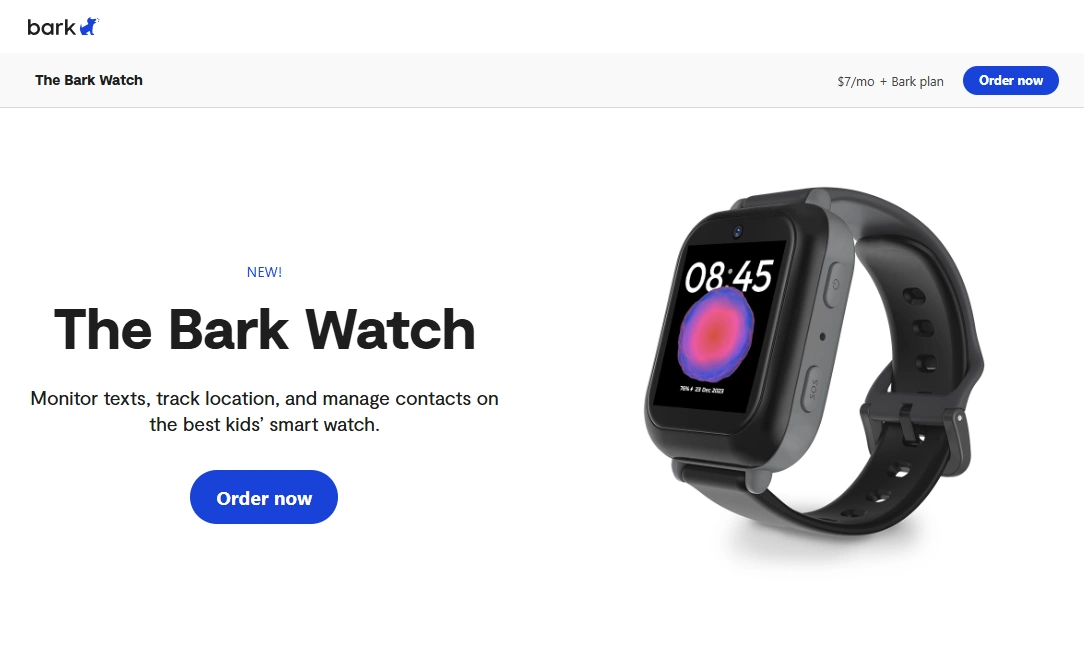
Bark Watch
Description
Bark Watch is designed for families who want a child to have independence without the full complexity (and distraction) of a smartphone. For school-age kids, the big value is the combo of location peace-of-mind and safer communication—with a parent-first control mindset.
Product highlights
- GPS location tracking focused on practical parent needs
- Safer communication model than giving a phone early
- School-friendly approach (reduce distraction, keep safety active)
- Good “step before a phone” for ages roughly 6–12
What’s to like
- Helps delay early smartphone and social app pressure
- Great for pickups, after-school activities, and check-ins
- Less “settings chaos” than locking down a cheap smartphone
What’s not to like
- If your child truly needs school apps/group chats, a phone may be necessary
- Like all GPS wearables, battery depends on tracking frequency
- Best results require a simple routine (contacts, zones, charging)
PROS
- Strong fit for school-age children as a first device
- Supports safety without opening the smartphone floodgates
- Parent-first design that’s easier to manage consistently
CONS
- Not meant to replace a full-feature smartwatch
- May feel limited for older kids who want “everything”
- Requires smart setup to avoid false alerts
Check Bark Watch Deep dive: Bark kids GPS watch review
Legal notes
GPS watches and parental controls should be used only on devices you own or manage (like your child’s watch/phone as a parent or guardian). Avoid tracking other adults without consent. If you want clear boundaries, read: Legal phone tracking: what’s allowed and what’s not.
FAQ
What is the best kids GPS watch for school-age children?
For most families, the best option is the watch that combines reliable location routines, approved contacts, and school-friendly controls without heavy maintenance. Bark Watch is a strong “school-age” pick for that reason.
Do geofences work reliably on kids GPS watches?
They can, but reliability depends on update intervals, signal strength, and device settings. Keeping zones simple (home + school) and tuning update frequency usually improves alerts.
What features matter most for school?
School mode that reduces distractions, approved contact calling, SOS, and predictable battery. “Extra apps” are usually less important than reliability.
Is a GPS watch better than a first phone for kids?
For many school-age kids, yes—because it supports independence and safety without introducing smartphone apps and social media early. A phone becomes better when school tools or group communication are truly needed.
How often should a kids GPS watch update location?
For most families, on-demand checks plus geofences are enough. Very frequent updates can drain battery quickly, so treat “live tracking” as something you use only when needed.
Is it legal to track my child with a GPS watch?
Parents/guardians generally can use location tracking on a child’s device they manage, but laws vary by location. Avoid tracking other adults without consent.