

A kids GPS watch is supposed to make life simpler: your child can reach you, you can check location, and you avoid giving a full smartphone too early.
In reality, parents usually run into the same pain points: location that updates too slowly, geofence alerts that arrive late, “school mode” that doesn’t stop distraction, or a battery that dies before pickup.
This Bark Watch review focuses on what matters in real life: location reliability, SOS, school mode, safe communication, and how to set it up so it stays useful (not annoying).
Short on time? Quick verdict
- Worth it if you want a practical “first device” for ages ~6–12: location + safer communication without the smartphone drama.
- Best for school routines when you actually use geofences + scheduled school mode (otherwise every watch feels “meh”).
- Not ideal if your child truly needs school apps or group chats — in that case, plan a controlled first phone instead.
Quick jump: Decision checklist · Verdict · Comparison table · What really matters · Best for your situation · Setup tips · Review · Legal notes · FAQ
60-second decision checklist
- Is your child 6–12 and mainly needs check-ins + safety? A GPS watch is often the best first device.
- Do you need calling/texting with approved contacts? Make “safe contacts” a must-have.
- Do you need “arrived at school” alerts? Then geofences + reliable updates matter more than “GPS accuracy” marketing.
- Do you want less distraction during class? You need a real school mode routine (scheduled, not manual).
- Battery reality: if you can’t commit to nightly charging, prioritize battery over frequent live tracking.
- If your child needs apps for school: skip the watch and choose a controlled first phone setup instead.
For a full walkthrough: how to set up a kids GPS watch with location alerts and school mode.
Verdict: should you trust Bark Watch?
Bark Watch is a strong choice for most school-age kids because it’s built around parent priorities: safer communication, practical location tracking, and routines that help keep school hours calmer.
The “secret” is not the watch itself — it’s the setup. If you use approved contacts, keep geofences simple (home + school), and schedule school mode, Bark Watch becomes a reliable daily tool instead of a noisy gadget.
Bark Watch vs other kid device options
| Option | Best for | Why it works | Trade-off |
|---|---|---|---|
| Bark Watch | Ages ~6–12, school routines, safer first device | Location + safe communication without a full smartphone | Not meant for school apps or full “smartphone-like” use |
| Basic kids GPS watch | Simple “where are they?” needs | Often simpler and sometimes better battery | Geofences/updates can lag; quality varies widely |
| Controlled first phone | Kids who truly need apps/group comms | More flexible for school tools | Harder to keep distraction-free unless rules are strict |
Related guides: best kids GPS watches with location tracking · best GPS watches for school-age children · best first phone for kids
What really matters: location, SOS, and school mode (the real-life version)
Location: “accuracy” matters less than update speed and consistency
Parents don’t need a perfect dot on a map — they need reliable routines: “they arrived,” “they’re still at the park,” “they’re on the way home.” If a watch updates late, geofence alerts become stressful instead of helpful.
Practical test: check the timestamp of the last location update. If it’s consistently old, lower update intervals (during commute hours) and keep battery expectations realistic.
Geofences should be boring
The best setup is usually just two zones: home and school. Add more zones only after you’ve proven those two work reliably for a week.
SOS is only useful if the child knows when to use it
SOS is great for peace of mind, but kids need one clear rule: “SOS is for fear, injury, or being lost.” Otherwise it turns into a boredom button.
School mode should reduce drama, not create more taps
School mode works best when it’s scheduled. Manual toggles become a daily fight (“I forgot to turn it on/off”). A schedule removes negotiations.
Battery is the hidden deal-breaker
Frequent tracking eats battery. If you need “near live” updates all day, expect daily charging. Most families do better with on-demand checks plus geofences.
Best for your situation
Best for ages 6–9: first independence
Walking to a friend, after-school clubs, short solo errands — Bark Watch covers the “reach me / find me” needs without opening up a smartphone.
Best for pickups and schedule chaos
If your main goal is “arrived at school / left school,” keep zones simple, tune alerts, and don’t chase perfect accuracy.
If you need backup location options on phones too: GPS tracker apps for families.
Best if your child is pushing for a phone
A watch can be a “bridge device” while you delay social apps. If a phone is truly needed (school apps/group comms), use a controlled option instead of a standard smartphone.
Kids phones with built-in parental controls · Social media-free phone options · Bark Phone
Setup tips & common issues
- Start with a tiny contact list: parents/guardians + 1 backup adult. Add friends later.
- Create only 2 geofences first: home + school. Test before adding more zones.
- Schedule school mode: remove daily negotiations and reduce in-class distraction.
- Tune update frequency: higher frequency during commute hours, lower during class to protect battery.
- Battery routine: same charging spot every evening (tie it to teeth + backpack).
- If alerts feel “wrong”: check timestamps, signal coverage, and whether the parent app has background restrictions.
Want the full step-by-step routine? Set up a kids GPS watch with alerts and school mode.
Bark Watch review
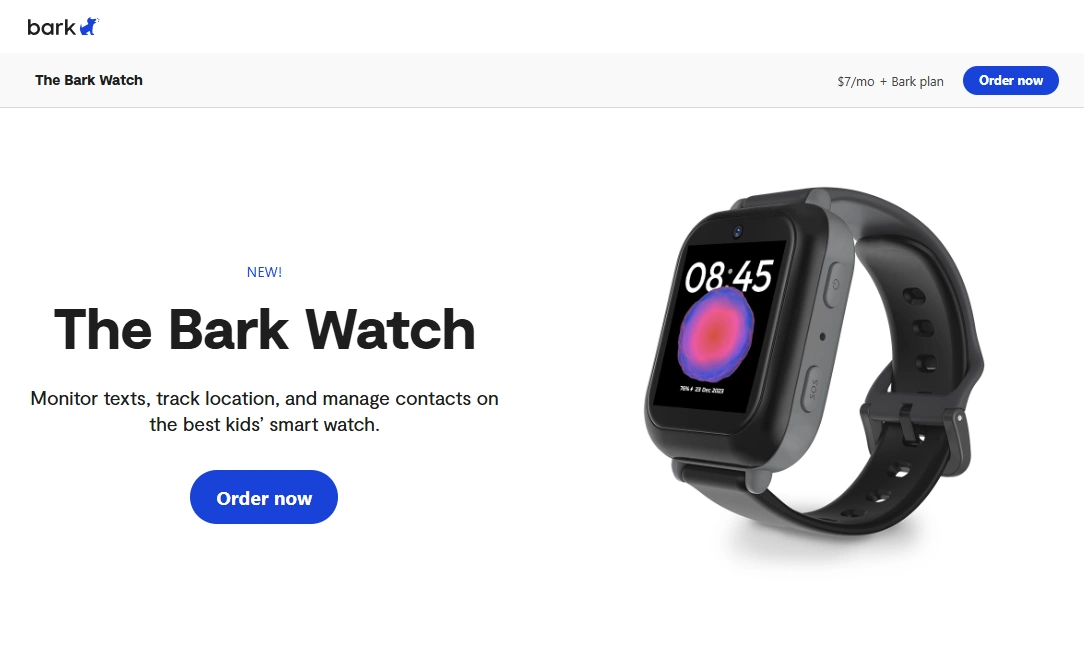
Description
Bark Watch is built for the “first independence” stage: your child can check in, you can verify location, and you avoid the early smartphone spiral (apps, social pressure, late-night use). The main value is not flashy smartwatch features — it’s parent-friendly control and predictable safety routines.
Product highlights
- Location tracking designed for practical parent use
- SOS-style emergency support (when paired with clear family rules)
- School mode approach to reduce distraction during class hours
- Safer communication model (approved contacts) vs giving a full phone early
What’s to like
- Great “bridge device” between no device and a first phone
- Supports school routines (especially with scheduled school mode)
- Less daily policing than a cheap smartphone with DIY restrictions
What’s not to like
- Not a replacement for a full smartwatch ecosystem
- If your child needs school apps, a phone may be required
- Battery depends heavily on tracking frequency and routines
PROS
- Strong fit for school-age kids as a first device
- Encourages independence without opening up social apps early
- Parent-first setup that’s easier to keep consistent
CONS
- Can feel “too simple” for older kids who want more features
- Requires a good initial setup to avoid false-alert stress
- Needs nightly charging if you use frequent location updates
See Bark Watch pricing & options
Legal notes
Use GPS watches and parental controls only on devices you own or manage (for example, your child’s watch/phone as a parent or guardian). Avoid tracking other adults without consent. If you want a clear overview: Legal phone tracking: what’s allowed and what’s not.
FAQ
What age is Bark Watch best for?
Bark Watch is usually best for school-age kids who need safe check-ins and location routines—often around ages 6–12, depending on maturity and school needs.
How accurate is Bark Watch location tracking?
Location usefulness depends on update frequency, signal, and the environment (indoors vs outdoors). In real life, consistent updates and reliable geofences matter more than “perfect accuracy.”
Does Bark Watch have school mode?
Yes, and it works best when scheduled so it becomes part of the school routine instead of a daily argument.
Does SOS actually help?
SOS is useful when paired with a clear rule for your child (“only for fear, injury, or being lost”). Without that rule, kids may trigger SOS for non-emergencies.
Is a GPS watch better than a first phone?
For many school-age kids, yes—because it supports independence without introducing apps and social media early. A phone becomes better when school apps or group communication are truly required.
Is it legal to track my child with a GPS watch?
Parents/guardians generally can use location tracking on a child’s device they manage, but laws vary by location. Avoid tracking other adults without consent.